





Tutorial
Video
Blog
LaTeX instructions for authors| Elsevier
Frequently Asked Questions
How to submit a Latex File in Editorial Manager?
文件目录结构
重要的一点时:所有文件必须在根目录下,不支持子目录引用,包含class文件、图片文件和tex文件等。原文描述:LaTeX submissions containing subfolders cannot be processed by EM. All submission files – including figures, tables, and style and bibliographic files – must be stored at the same folder level.
文件目录结构示意:
Folder
- LaTeX_sample_file.tex
- Other_LaTeX-files.tex (if used)
- Bibliography.bib or Bibliography_file.bbl
- Nomenclature files (.nls, .ilg, and .nlo)
- Sample.sty (if not available on our EM TeX installation)
- Sample.cls (if not available on our EM TeX installation)
- Sample.bbl (if not available on our EM TeX installation)
- Sample.bst (if not available on our EM TeX installation)
- Image_files.eps
- Image_files.png
- Image_files.pdf
使用overleaf
可以使用的编译器有:
- LaTeX
- pdfLaTeX
- pdfTeX
- TeX
- XeLaTeX
编译时设置为红色箭头所指的错误处理方式:
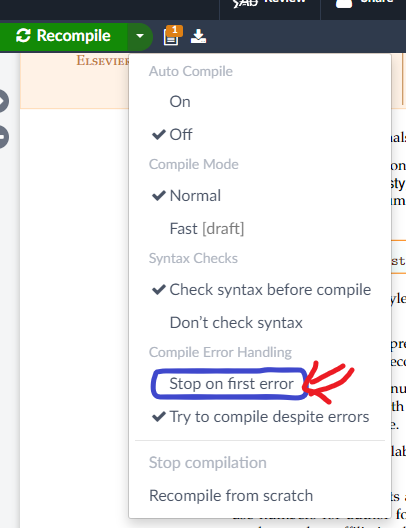
原因:Unlike EM, Overleaf generates a PDF even if compilation errors occurred – it does not stop at every error. In EM, however, compilation errors will generate an error log PDF only.
文件名
- Filenames should contain only one period to mark the extension (e.g.,
fig.1.epsis not supported by EM, butfig1.epsis correct). 文件名中只能有一个句点。 - Files of any type with special characters in the filename will also be excluded (e.g.,G+.eps).不要使用特殊字符,如+号。
- 不要使用Elsevier的保留字,包括:
CON, PRN, AUX, NUL, COM1, COM2, COM3, COM4, COM5, COM6, COM7, COM8, COM9, LPT1, LPT2, LPT3, LPT4, LPT5, LPT6, LPT7, LPT8, and LPT9. - 文件名不能相同,即使扩展名不同!
- 压缩包上传只支持
.zip和tar.gz两种格式。 - Do not upload LaTeX files as Supplemental items.
支持的图片格式
EM supports many image file formats, including .png, .pdf, .jpg, .mps, .jpeg, .jbig2, .jb2, .eps, .ps, and .tif (note that .tif files cannot be used within the \includegraphics Command.
编译不成功
How to submit a Latex File in Editorial Manager? - Journal Article Publishing Support Center
Comments NOTHING